How do I send an SMS message from the Yay.com mobile app?
Before you can send SMS from the app, you need to ensure that your user profile has a valid SMS Message ID set. This is the number that the SMS will be sent from.
You can change this to any mobile number you are permitted to use in the chat settings of your mobile app.
To set the default SMS Message:
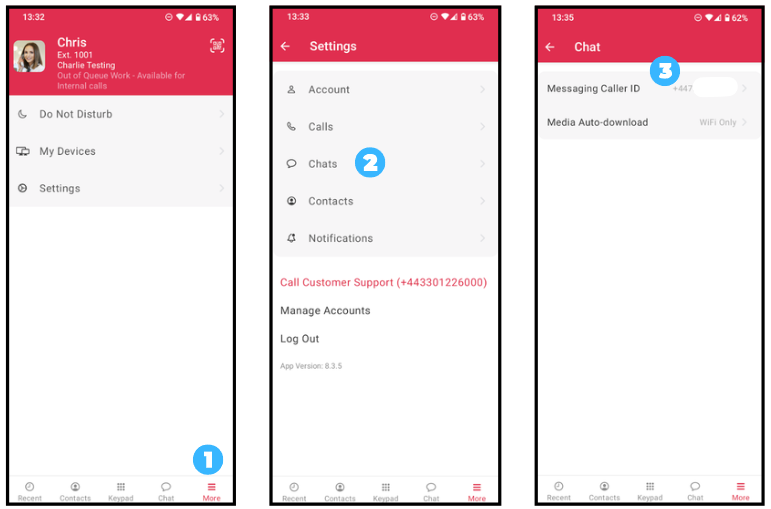
1. Open the mobile app and press More.
2. Go to Chats.
3. Then navigate to the Message Caller ID and select a mobile number from the drop-down box provided.
To send an SMS from the mobile app:
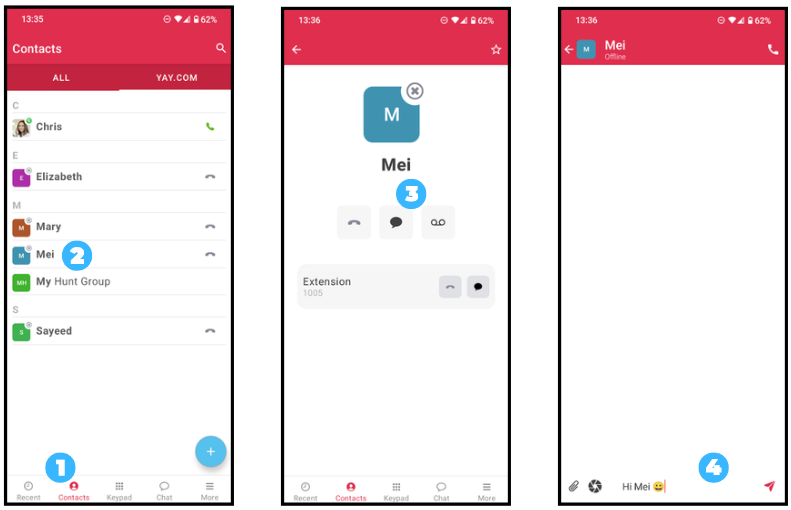
1. Press Contacts.
2. Select the contact you want to send an SMS to.
3. You can then specify whether you want to call the contact or message them (press the message button on the right).
4. You will then enter the conversation screen. You can write your new message at the button of the screen and press the red Send button when ready.