Cloud PBX
How do I add users to a department?
It is possible to organise your Users into Departments in the Yay.com Dashboard.
To do this:
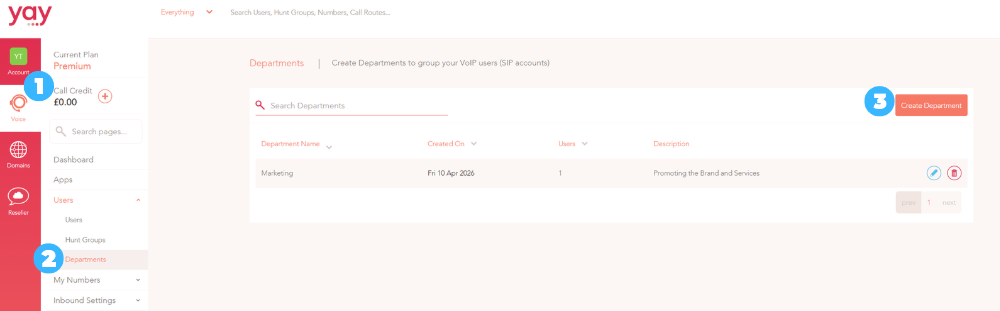
1. Click on the Voice option from the Main Menu on the left.
2. Then select Departments in the Users sub-menu.
3. Click the Create Department button on the right.
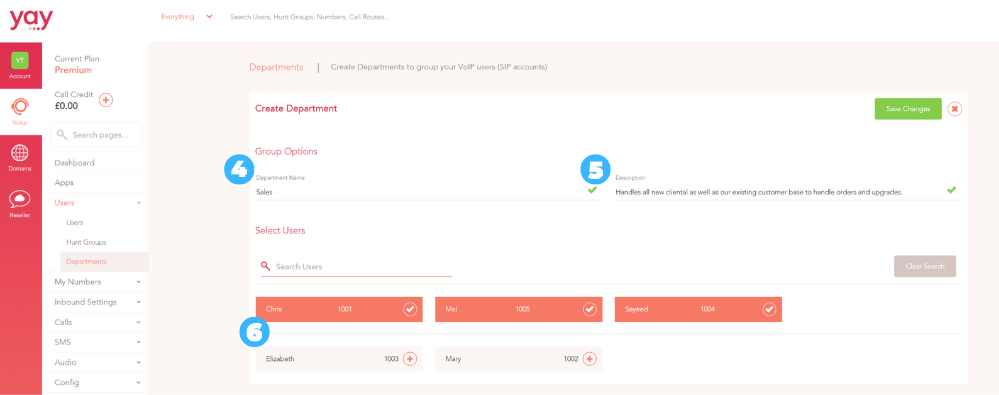
4. Enter the Name of the Department
5. You can write a Description for the department (optional).
6. Select the Users you would like to place in the Department and then click the Save Changes button
Using the Yay.com app, users can see which department a member of staff is a member of by click on their name.
Users can also message everyone in a department simultaneously by inputting @ followed by the name of the department e.g @Sales
